
 Design Custom OSHA and ANSI Safety Tags Online
Create custom OSHA safety tags and custom ANSI safety tags in minutes. This easy-to-use Design ID Pro tool helps you create 25-packs of clear, compliant custom tags for hazards, lockout tagout, and more. Customize your tags with your own text, symbols, and colors to meet your needs. Start designing your custom safety tag now.
Design ID Pro Tutorial
Custom OSHA & ANSI Safety Tags - 3 Sizes & 13 Headers - Packs of 25 Tags
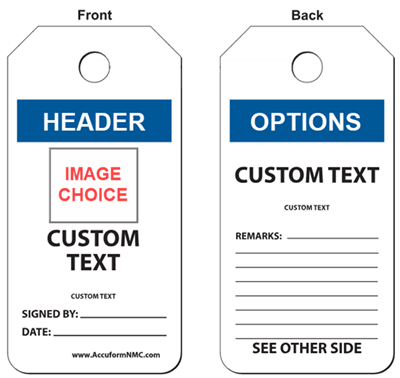
Create personalized safety tags that match your exact needs. Choose from multiple sizes, headers, and color options to create tags that fit your equipment, procedures, and safety programs. ComplianceSigns custom tags provide:
- Industrial Strength: Printed on waterproof, tear-resistant poly cardstock for durability.
- Write-On Surface: Matte finish designed for permanent markers—no smearing or fading.
- Fully Custom Design: Choose from 3 sizes, 13 compliant headers, and double-sided layouts.
- Sold in packs of 25: So you have all the tags you need.
- All tags are proudly made in the USA with fast production turnaround.
Why Create Custom ANSI & OSHA Safety Tags?
Stock tags don't always match your unique hazards. Custom OSHA and ANSI tags ensure clear communication and compliance.
- Tailor safety messages to your specific equipment and procedures
- Support OSHA and ANSI compliance requirements
- Improve workplace safety communication and consistency
- Reinforce lockout/tagout and hazard identification programs
- Durable materials designed for indoor and outdoor use
- Easy reordering with saved designs
Common Uses for Custom OSHA and ANSI Safety Tags
- Lockout/Tagout (LOTO) procedures
- Ladder and scaffold inspections
- Hazard identification and warnings
- Machine safety
- Out-of-service labeling
- Temporary or site-specific safety messaging
How to Design Your Own ANSI and OSHA Safety Tags
1. Choose a header for the front and back (13 options available)
2. Select a symbol or image, or leave blank (dozens of choices)
3. Pick a background for the front (13 options)
4. Add custom text for the front (2 lines)
5. Choose a background for the back (3 options)
6. Add text for the back (2 lines)
7. Select finishing options, including 3 corner styles
Review your design, then click Add to Cart. It’s that easy to create custom safety tags online.
You can email yourself a proof to review or share, and save your design to your ComplianceSigns account for fast and easy reorders.
Ready to create custom OSHA and ANSI safety tags? Start designing now.
Do you use a lot of OSHA tags? Use our Custom OSHA / ANSI Tags by the Roll builder to make 250 custom tags on a roll in a convenient dispenser box.
Shop stock safety tags for lockout-tagout, inspections, ladders, machine safety and more.
Designed for OSHA & ANSI Compliance
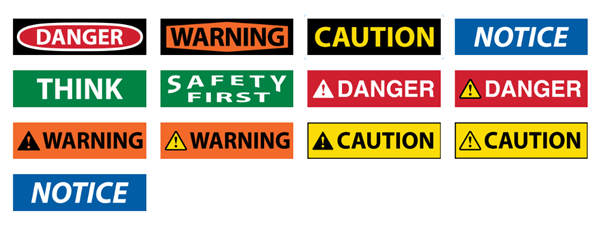
These Design ID Pro custom safety tags use standard OSHA and ANSI formats that support:
Choose from standard headers including:
- OSHA DANGER
- OSHA WARNING
- ANSI CAUTION
- ANSI NOTICE
- SAFETY FIRST
- And more
These familiar formats help ensure your custom safety tags are clear, consistent, and easy to recognize.
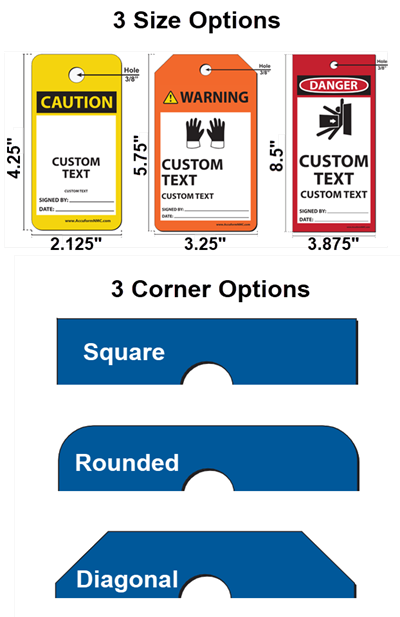
Tag Specifications
Available in 3 Sizes:
- 4 1/4 x 2 1/8 inches
- 5 3/4 x 3 1/4 inches
- 8 1/2 x 3 7/8 inches
Customization Options:
- 13 standard headers
- Front and back text
- Multiple color/background choices
- Optional symbols or images
- 3 Corner style options:
- Square
- Rounded
- Diagonal
Your custom OSHA tag or ANSI tag is made to withstand demanding conditions:
- Waterproof Poly Cardstock: Resists moisture, grease, and chemicals.
- Matte Surface: Resists scuffs, smears, and is easy to write on.
- Tear-Resistant: Will not crack, shrink, or distort under heavy use.
- Secure Attachment: Each tag features a 3/8" hole
- Made in the USA: High-quality production with fast turnaround times.
Create ANSI- or OSHA-compliant tags tailored to your exact needs. Design online, save your layout, and reorder anytime.
It’s Easy to Make & Order Custom Tags and Signs at ComplianceSigns.com.
Custom OSHA & ANSI Tags - FAQ
What makes a safety tag OSHA- or ANSI-compliant?
Compliance relies on specific signal words, color codes, and layouts. OSHA tags typically follow 29 CFR 1910.145, while ANSI tags follow the newer Z535 guidelines. Our builder uses these templates to ensure your tags meet regulatory scrutiny.
Do different tag headers mean different things?
Yes. The headers on tags and signs indicate different hazard levels. Danger tags indicate immediate hazards that could result in death or serious injury. Caution tags identify minor hazard situations with lower injury risk. Use Warning tags for hazard levels between Danger and Caution. Use Notice Tags for information that is important, but not hazard-related.
What should I include on a custom OSHA safety tag?
OSHA or ANSI safety tags must include a signal word (such as Danger or Warning), a clear description of the hazard, and instructions to avoid the hazard. You can also include additional details like names, dates, or departments for tracking purposes.
Can I create custom OSHA lockout/tagout (LOTO) tags with this tool?
Yes. This builder is ideal for creating custom lockout/tagout tags. You can add equipment details, hazard warnings, and instructions to support your LOTO safety procedures and prevent accidental startup.
What material are these tags made from?
These tags are printed on durable poly cardstock. They are waterproof, tear-resistant, and more durable than traditional paper tags. Great for use in industrial and outdoor environments.