

CSxxxxxx
CS432792, CS839400, CS642914, CS613788, CS360758, CS460120, CS868437, CS292335, CS240381, CS277713
40 or 100 Watt Sign Projector for Dark or Dim Areas
Use this LED sign projector to display your safety or promotional message on floors or walls without the mess and maintenance of paint or adhesives.
Two power level options provide illumination to make your images shine. Use sign projectors throughout your facility for bright, consistent and effective messaging in areas where traditional signage isn't practical or effective. For bright areas, consider a high-power sign projector.
Choose from our large selection of stock GOBO (GOes Before Optics) message / image lenses, available separately. We can also make custom message lenses to meet your specific needs.
Why Use Sign Projectors?
- Projected images don't get worn and torn from forklift and other traffic
- Projectors eliminate costly floor marking replacements
- Bright, colorful images make your message stand out
- Easy to install and use - just plug and play
- Reliable operation with LEDs rated for up to 40,000 service hours
Easy To Use:
- Mount to ceilings, walls, or racks
- Hard wiring not required
- Uses 110 to 277 volts AC
- Operates in temperatures from -40 to 128°F
- Standard mounting hardware included
- Case is IP65 rated for humid conditions (not recommended for outdoor use)
- Accessories and custom message lenses available
- Review our projector FAQ sheet
- Download the standard sign projector instructions sheet (pdf).
How To Select and Purchase Sign Projectors
To select the right projector for your needs, consider your installation location and desired image size. Here is information to help you choose:
Step 1: Determine How Many Watts You Need
Mounting height and light level affect viewing distance. We offer two standard power options:
- 100 watts: For use in dim lighting. Mount as high as 35 feet for image sizes up to 10 feet.
- 40 watts: For dim or dark areas. Projects images up to 164 feet in dim light, or 262 feet in complete darkness.
Step 2: Determine What Lens Angle You Need
The angle of the projector lens, combined with the mounting height, determines the size of the projected image. We offer lenses to suit:
- Mounting heights from less than 10 feet to as much as 40 feet
- Image sizes from 2 feet to 17 feet, depending on the projector
How to select the lens angle:
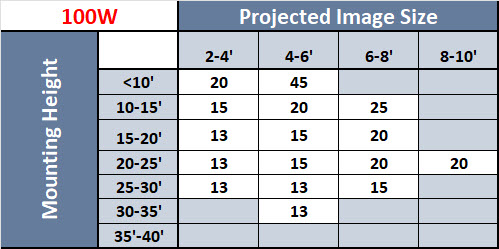
- Find your mounting height in the left column and your desired image size in the top row.
- The lens angle you need is the number in the table where your mounting height meets your image size.
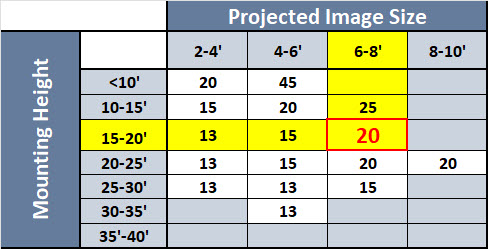
100-Watt Projector Chart
For example, at a 15-20' mounting height, a 6-8' image requires a 20-degree lens.
Step 3: Make your selections above and click Add to Cart
Next, remember to select a GOBO message lens for your projector.
Have Questions? Call us at 1-800-578-1245 for assistance.